RabbitMQ Complete Guide
From Beginner to Advanced Concepts
1. Introduction
What is RabbitMQ?
RabbitMQ is a message broker system used for communication between different services in a distributed system. It allows applications to send and receive messages asynchronously instead of direct communication.
Why RabbitMQ is used?
In traditional systems, direct communication leads to tight coupling and blocking operations. RabbitMQ solves this by providing:
- Loose coupling
- Asynchronous processing
- High scalability
- Reliable message delivery
- Fault tolerance
2. Core Concepts
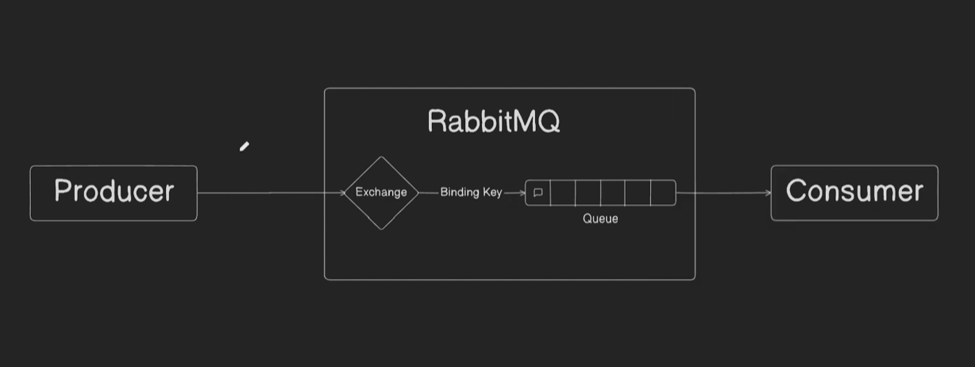
The Post Office of RabbitMQ. It receives all messages from producers and directs them to specific queues. It never stores messages; it only routes them.
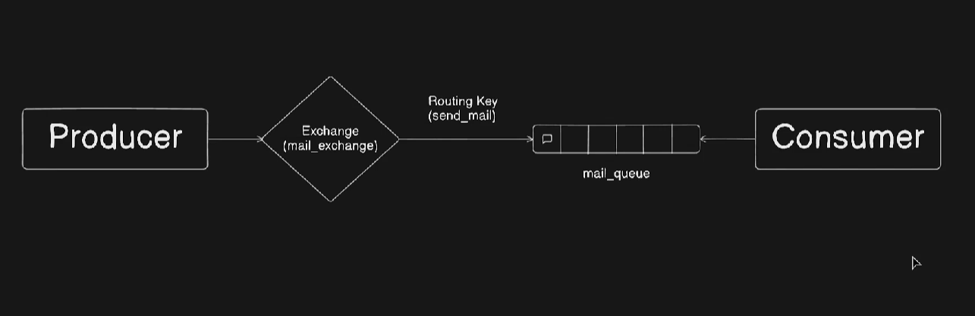
The Address on the message envelope. It is a string attached to the message by the producer which tells the exchange where to send the data.
The Filter or link between an exchange and a queue. For a message to reach a queue, its Routing Key must satisfy the rules of the Binding Key.
The Mailbox. It stores messages safely until a consumer is ready to process them. Unlike exchanges, queues are persistent and hold data.
3. Architecture
The basic flow is: Producer → Exchange → Queue → Consumer
4. Types of Exchanges
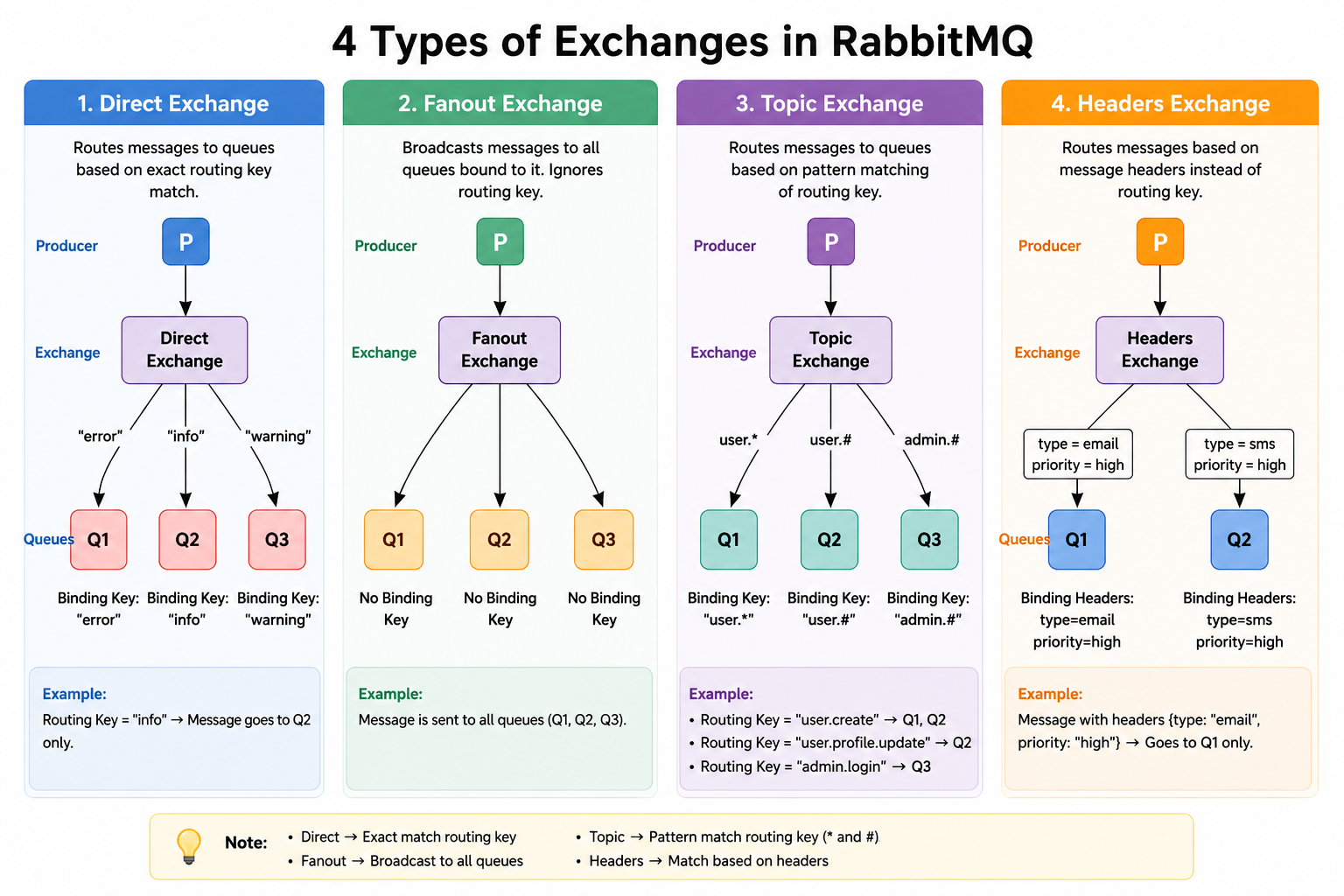
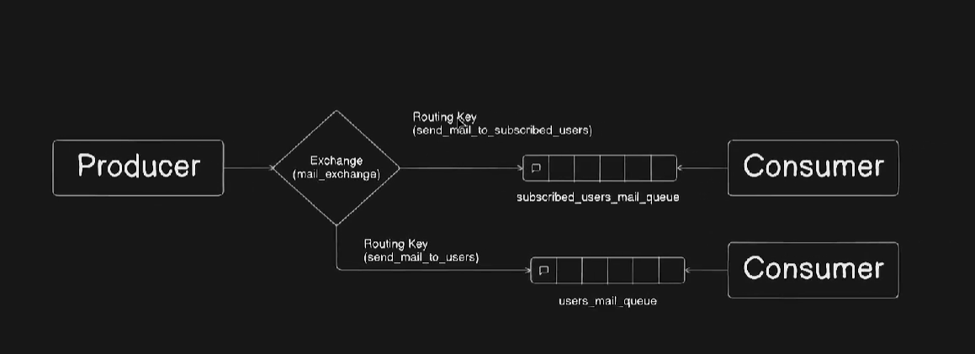
What: The simplest form of routing where a message goes to specific queues based on a unique key.
Mechanism: Routes messages using an exact match between the routing key and the binding key.
Use Case: Targeted notifications or distributing specific tasks to specialized workers.
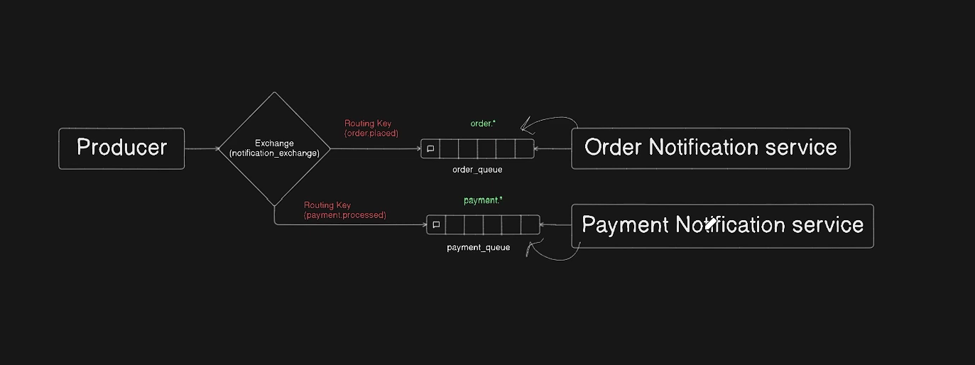
What: A flexible routing system that allows consumers to subscribe to patterns of messages.
Mechanism: Uses pattern matching with dot-separated routing keys and wildcards:
*→ Matches exactly one word (e.g.,usa.*matchesusa.news).#→ Matches zero or more words (e.g.,usa.#matchesusa.news.sports).
Use Case: Geographic routing, category-based news feeds, or complex microservice event streams.
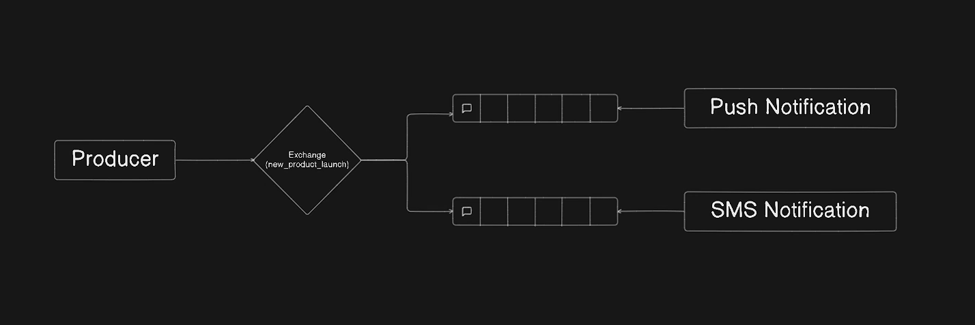
What: A broadcast-style routing system that ignores routing keys entirely.
Mechanism: Broadcasts every message it receives to all queues that are bound to it.
Use Case: Real-time leaderboard updates, group chats, or distributing global configuration changes.
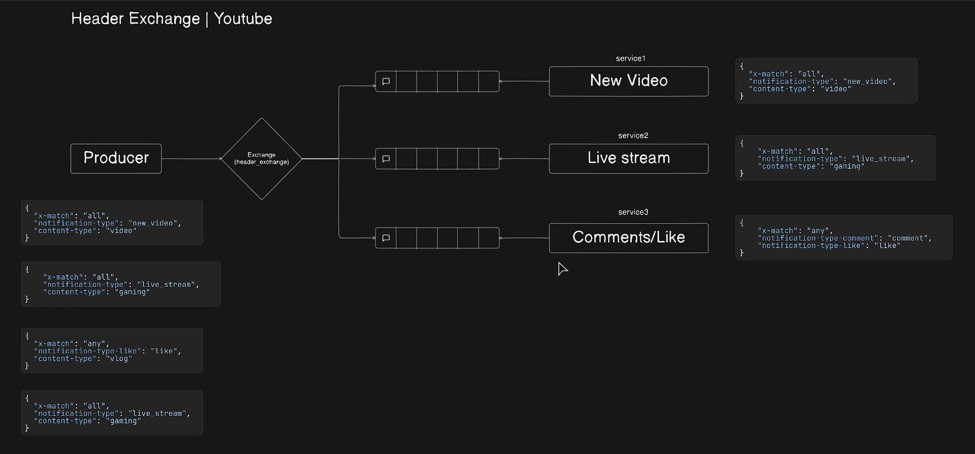
What: An advanced routing system based on message attributes rather than routing keys.
Mechanism: Uses message headers for routing. It supports logic like:
x-match = all: All specified headers must match.x-match = any: At least one header must match.
Use Case: Complex filtering systems where multiple independent criteria must be met (e.g., file type + priority + region).
What: A specialized queue that reorders messages based on a priority value.
Mechanism: Messages are assigned a priority level (e.g., 0-10). The broker delivers higher-priority messages first.
Use Case: Ensuring critical system alerts or high-value payments are processed before background logging tasks.
5. Advanced Concepts
What: A signal sent by the consumer back to the broker to confirm that a specific message has been processed.
Why: Prevents message loss if a consumer crashes mid-process. The broker only deletes the message after receiving this signal.
Case: Essential for any critical task where data integrity is required.
What: Automatically attempting to process a failed message again before giving up.
Why: Handles transient errors like database timeouts or temporary network glitches.
Case: Used when interacting with external APIs or volatile internal resources.
What: A dedicated queue where messages are sent if they fail all retry attempts or are rejected.
Why: Prevents "poison pill" messages from blocking your main queues and allows manual inspection of failures.
Case: Debugging invalid data formats or unrecoverable logic errors.
What: A queue where messages are assigned a priority level (typically 0-10).
Why: Ensures that urgent messages are processed before background tasks, even if they arrive later.
Case: Processing high-priority payments before low-priority log archiving.
What: A queue property that ensures its metadata is persisted to disk.
Why: Prevents the loss of queue structures and messages (if persistent) during broker restarts or crashes.
Case: Recommended for all production environments to ensure system resilience.
6. Docker Setup
Run RabbitMQ locally with the management dashboard using this command:
docker run -d \
  --name rabbitmq-server \
  -p 5672:5672 \
  -p 15672:15672 \
rabbitmq:3-management- 5672: Standard AMQP port for application communication.
- 15672: Management Web UI (Username/Password: guest/guest).
7. Node.js Implementation
First, install the amqplib library in your project:
npm install amqplibimport amqp from "amqplib";
const sendMessage = async () => {
const connection = await amqp.connect("amqp://localhost");
const channel = await connection.createChannel();
const exchange = "nishan_exchange";
const exchangeType = "direct";
const routingKey = "nishan_routing_key";
// Assert Exchange and Queue
await channel.assertExchange(exchange, exchangeType, { durable: false });
await channel.assertQueue("mail_queue", { durable: false });
// Binding Queue to Exchange with Routing Key
await channel.bindQueue("mail_queue", exchange, routingKey);
const message = { body: "Hello from Direct Exchange!" };
channel.publish(exchange, routingKey, Buffer.from(JSON.stringify(message)));
console.log("Message sent:", message);
};import amqp from "amqplib";
async function consume() {
const connection = await amqp.connect("amqp://localhost");
const channel = await connection.createChannel();
const queue = "mail_queue";
await channel.assertQueue(queue, { durable: false });
channel.consume(queue, (msg) => {
if (msg !== null) {
console.log("Received:", msg.content.toString());
channel.ack(msg);
}
});
}8. Real-World Use Cases
User signup → RabbitMQ → Email service
Order → Payment → Inventory → Delivery
Upload → Resize worker → Store
App logs → Queue → Log processor → DB